
Everything about the Cozy Farm event
Обновлено 24 окт. 2026 г.
Этот гайд пока доступен только на английском. Русский перевод появится позже.
Introduction
Cozy Farm is a team farming event: you fertilise the crops in your garden so they gain weight (kg), borrow other players' Tatari as support to make them grow faster, and use the total weight to hit milestones and climb the team ranking.
The new Cozy Farm adds natural growth and a Request Support system that's quite different from before. In this guide, Fox sums up the rules and the tips learned from test-feeding lots of different plots!
At a glance:
- What matters most is your support Tatari's Growth Speed, not how heavy the crop is.
- Log in right when a new round starts to grab strong support before others do.
- Attach support first, fertilise second.
- Pour all your fertiliser into the plot with the highest Growth Speed that round.
- For popular trainers, tap Reserve to hold a spot for the next round.
1. Cozy Farm basics
Tap the ? next to the Cozy Farm title to read the rules. The key points:
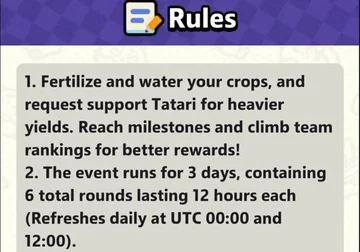
- Fertilise and water your crops, using support Tatari to make them heavier. Hit milestones and climb the team leaderboard for better rewards.
- The event lasts 3 days with 6 rounds of 12 hours each. New rounds start at 00:00 and 12:00 UTC every day.
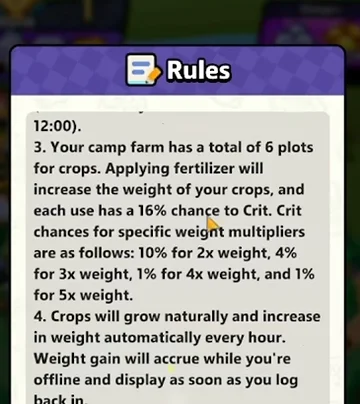
- Your garden has 6 plots.
The main screen shows your team's rank, each member's weight in the left column, the Obtain box top right, and the big fertilise button in the middle with your fertiliser count below it. Each crop shows its growth % (support bonus included) and current weight.
2. Fertilising, crits and natural growth
Per rules 3 and 4:
- Every feed adds weight and has a 16% Crit chance. The rates per multiplier: 10% x2, 4% x3, 1% x4, 1% x5 weight.
- Crops grow on their own every hour (natural growth). It still adds up while you're offline and shows when you log back in.
- Weight accumulates over the whole event and doesn't reset between rounds. When a crop reaches a weight threshold, its rarity goes up and so do the rewards.
 Note: the fertilise button reads x200, so it may use 200 fertiliser per tap. Check the count under the button before tapping repeatedly. As for crits, they're pure luck, so don't build a plan around them.
A heavier crop doesn't get less kg per feed. This is the biggest change from the old version, where bigger crops gained less. Now, on a non-crit feed, each feed adds a fixed amount of kg that depends only on the plot's growth %. Test results:
| Plot | Growth % | Weight before → after | Kg per feed |
|---|---|---|---|
| Carrot plot | +255% | 181,453 → 185,003 | 3,550 |
| Frog plot | +244% | 72,982 → 76,422 | 3,440 |
| Another plot | +243% | 41,728 → 45,158 | 3,430 |
| Another plot | +243% | 20,806 → 24,236 | 3,430 |
The plot at over 181,000 kg still gets more kg than the one at 20,000 kg, simply because its growth % is higher. So a crop's current weight doesn't matter; its growth % does.

Natural growth is a fixed amount too
Every hour, plots around +250% gain 10 kg, while a plot at only +126% gains 6 kg. Weight doesn't matter, growth % does. It's small next to fertiliser, but the earlier you get support, the more hours it stacks up.

Bonus when a crop changes colour
When a crop changes colour (to gold, for example), it sometimes gets an extra 40 or 80 kg. The exact weight threshold isn't known yet. With little fertiliser it's noticeable; with lots, it barely matters.
3. Request Support: pick the Tatari with the highest Growth Speed
Tap Support to open the Request Support screen. Each plot has its own support list; use the left/right arrows to switch plots. Each row is a trainer lending a Tatari, with the Tatari's grade (S, A, B…) and its Growth Speed +X%. Tap Support to take that trainer for the selected plot.
Support Growth Speed boosts both fertiliser and natural growth (rule 6). So:
- Log in right when a new round starts (00:00 or 12:00 UTC). Lots of people do the same, so strong support runs out fast.
- Prioritise the plot with the strongest support. Not every plot needs great support. One plot with very high support is enough to pour fertiliser into.
- Attach support before fertilising. Don't fertilise first and look for support afterwards.
- Glitter (Shiny) support is stronger. In Cozy Farm, Shiny support Tatari are stronger than regular ones, so watch for them while scrolling and aim for the highest Growth Speed you can find.
- If a plot already has weak support from the opening tutorial (say only +126%), don't fertilise it; move to a plot with higher Growth Speed.
4. Popular trainers: use Reserve for the next round
Each support only lasts one round (the “Round 1 Support Ends in…” timer counts down 12 hours). High-Growth-Speed trainers get lots of requests, and when full they show “Limit reached for this round”.
The button then turns into Reserve. The game says “You can reserve popular trainers for the next round”, meaning you can book that trainer ahead for the next round.
- Missed good support this round? Wait 12 hours for the next round and log in early.
- Towards the end of the event, strong support fills up more often. Then Reserve is almost the only way to be sure of good support.
5. Pour all your fertiliser into one plot
Since each feed adds fixed kg based on growth %, the most efficient approach is:
Шаг 1
Find the plot with the highest growth %
After attaching this round's support.
Шаг 2
Put all your fertiliser into it
Don't spread it across all 6 plots.
Шаг 3
Switch plots when better support appears
Next round, if another plot gets stronger support, fertilise that one instead.
In the test above, the +255% carrot plot gave about 100–120 kg more per feed than the +243% plots. The more you feed, the bigger the gap.
Should you save fertiliser for the last day? You can. A heavier crop doesn't gain less, so day one and the last day are the same, as long as you have high Growth Speed support when you feed. If you want to dump everything on the last day, make sure you grab or Reserve very strong support for the final round, feed it all in one go and claim your rewards. On the other hand, if you land very high support in the first round, feed during that round's 12 hours and don't wait.
6. Milestones, team ranking and fertiliser from pinball
As your total weight grows, you unlock milestones (Reach…) one by one, each with gold coins, items and gift boxes.
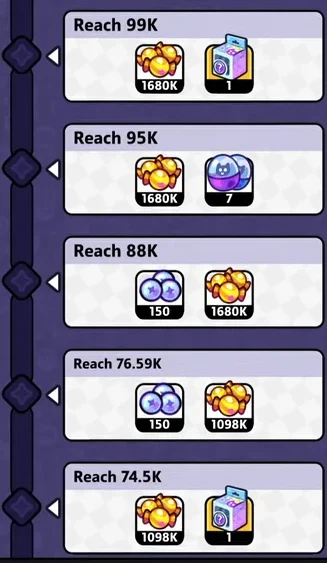
There's also the team leaderboard: the left column of the main screen shows each member's weight, and your team's rank decides the ranking rewards. If everyone finds good support and feeds the right plot, the whole team climbs much more easily.
One fertiliser source is pinball: the pinball board has reward slots with a fertiliser bag icon, and the Cozy Farm icon on the right edge shows how much fertiliser is waiting for you.

Tip: once you've fertilised and claimed all your Cozy Farm rewards, if you like saving pinballs for the next event, you can keep the rest for it.
Мнение Fox
Чаще всего в Cozy Farm, по наблюдениям Fox, ошибаются, считая, что большое растение менее выгодно удобрять. Важна Growth Speed у Tatari поддержки, так что вкладывайте удобрения в участок с самой сильной поддержкой, даже если растение уже тяжёлое.
Cozy Farm платит меньше других событий, поэтому Fox не стал бы вкладывать в неё много сил. Просто заходите в начале раунда за хорошей поддержкой, прикрепляйте её до удобрения — и получите большую часть того, что даёт это событие.
Расписание событий на сегодня →Когда начнётся следующий раунд.Summary: Cozy Farm checklist
- Know the schedule: 3 days, 6 rounds, new rounds at 00:00 and 12:00 UTC.
- Log in at the start of each round to grab high Growth Speed support.
- Use the arrows in Request Support to see each plot's support.
- You only need one plot with really strong support.
- Prefer glitter (Shiny) support; it's stronger in Cozy Farm.
- Attach support first, fertilise second.
- Pour all fertiliser into the plot with the highest growth %, not evenly.
- Heavy crops don't gain less, so keep feeding the big one.
- If a trainer shows “Limit reached”, tap Reserve for the next round.
- Saving fertiliser for the last day? Make sure you have strong support in the final round.
- The button reads x200 and may use 200 fertiliser per tap: watch your count.
- Don't plan around crits; they're luck.
- Track milestones and team rank, and get your teammates doing the same.
Другие гайды
- The event cycle: order, when to claim, and hoarding
- Tips for every event: Zobo Shooter, Fishing, Marathon, Cozy Farm, Treasure Hunt
- Marathon Party: keeping pinballs, picking rewards and a fun Easter egg
- Zobo Shooter: the complete guide to rules, arenas, chests and rewards
- Zobo Shooter tips: pick your Tatari and arena, and hunt bosses to climb
- Everything you need to know about the Fishing event
- Everything you need to know about the Treasure Hunt event
- Everything you need to know about Gold Rush formations
- Lost City Goldrush: миражи, Desert Horn и новые титулы лиги
- Гайд по Artifact Adventure в Clash of Critters: факелы, бои с Zobo и кодекс команды